Arcade Jumping Game Design Basics
A good arcade jumping game is built on a few principles: one core action that feels good on its own, hazards the player can read at a glance, difficulty that rises smoothly, input handling that forgives tiny human imprecision, and clear feedback for every success and failure. Get those right and even a very simple game holds attention; miss one and players blame the game instead of themselves. This guide walks through each principle, how it is typically implemented, and where you can see it in the games on this site.
Principle 1: build around one core verb
Arcade games work best when a single action carries the whole experience. In jumping games that verb is, unsurprisingly, the jump, but the interesting design work is in what the jump means.
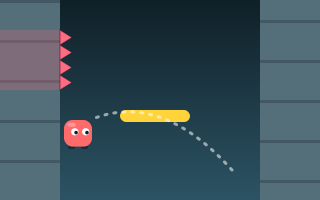
- In Wall Jump, the verb is "leap to the other wall." You cling and slowly slide down; one press sends you across.
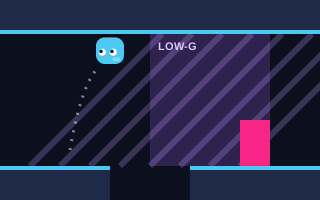
- In Gravity Jumper, the button does not jump at all in the usual sense: it flips gravity, so you fall to the ceiling or back to the floor.
- In Perfect Jump, the verb is "commit to a power level" by stopping a swinging meter.
Each is one input with one clear consequence. A useful test: if the core action is not satisfying in an empty room with nothing to avoid, adding obstacles will not fix it. The physics that makes a jump feel good is covered in jumping game physics explained.
Principle 2: make everything readable at a glance
Arcade players make decisions in fractions of a second, so every object on screen should announce what it is. Common techniques:
- Color coding. Endless Jumper uses green for normal platforms, blue for moving, orange for crumbling and yellow for springs.
- Zone shading. Gravity Jumper shades low-gravity zones purple so players expect slower, floatier flips before they enter.
- Indicators. Sky Jump shows an on-screen WIND indicator for the direction of gusts; Double Jump Challenge shows two dots for the jumps you have left.
- Distinct silhouettes. Hazards should look different from safe surfaces even without color, which also helps players with color vision differences.
The accessibility guidelines published by the W3C are written for web content rather than games, but their emphasis on not relying on color alone is a sound rule for game objects too.
Principle 3: raise difficulty smoothly
Arcade games usually get harder by turning a few dials over time rather than by introducing whole new rules. On Jumping Arcade those dials include speed (Jump Over, Jump Rush, Tiny Jumper), size (narrower pillars in Perfect Jump, shrinking platforms in Moving Platforms), spacing (wider gaps in Endless Jumper, sparser pads in Bounce Up) and pressure (the accelerating lava in Lava Jump, the self-scrolling tower in Tower Jumper).
A few rules of thumb keep a curve fair:
- Change one dial at a time where possible, so players can tell what got harder.
- Make the first thirty seconds almost impossible to fail, so every run starts with confidence.
- Never generate a situation that cannot be survived. For generated levels, this means reachability checks; see how procedural platforms work.
Designing for restraint, not just reflexes
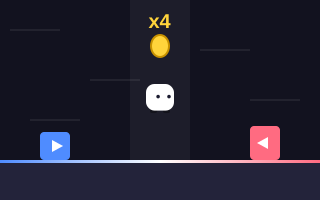
Difficulty is not only speed. Jump Rush makes restraint part of the challenge: hazards arrive from both sides, and while each clear raises the combo multiplier up to x5, a wasted jump resets it. That single rule turns a reflex game into a decision game.
Principle 4: forgive tiny imprecision
Human timing is not frame-perfect, and strict rules can feel unfair even when they are technically correct. The platform genre has developed well-known techniques that designers can choose from:
| Technique | How it works | Pseudo-code idea |
|---|---|---|
| Coyote time | Allow a jump for a brief moment after leaving a ledge | if (timeSinceGrounded < coyoteWindow) jump() |
| Jump buffering | Remember a press made just before landing and use it on touchdown | if (grounded && timeSincePress < bufferWindow) jump() |
| Variable jump height | Cut upward speed when the button is released early | if (released && vy < 0) vy *= 0.5 |
| Generous hitboxes | Make hazard collision areas slightly smaller than their drawings | hazardBox = shrink(spriteBox, margin) |
These are general genre techniques rather than a description of any specific game's code. The principle behind all of them is the same: the game should do what the player meant, not only what they literally pressed.
Design tip: when testing, watch for moments where a player says "I pressed it!" Those are usually cases where a small input window or a stricter hitbox would make the game feel fairer without making it easier.
Principle 5: give instant, layered feedback
Every important event should be felt through more than one channel. A landing might combine a sound, a small visual effect and a score change. Good feedback also grades performance, not just success or failure: Perfect Jump labels center-target landings as PERFECT, and Bounce Up rates boosted bounces as GOOD or GREAT. Graded feedback tells players they are close, which encourages another attempt.
Browser games can generate sound effects entirely in code with the Web Audio API, which is how the games on this site produce their beeps without any audio files. Short, distinct sounds for jump, land, bonus and failure let players keep their eyes on the action.
Principle 6: make failure cheap and restarts fast
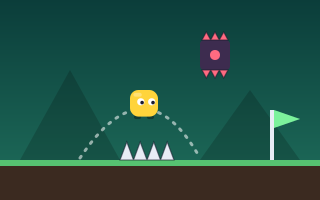
Arcade games ask players to fail constantly, so the cost of failing must be low. That means a clear, immediate reason for the failure, a restart that takes a moment, and some sense of progress. Different games handle this differently: most of ours simply end the run and let you start again, with your personal best kept in your browser, while Spike Jumper gives you 3 lives with respawns at the last checkpoint flag, which suits its longer, section-based structure. Daily Jump Challenge takes another route entirely, with a fixed 60-second limit on a course that is the same for everyone that day.
Principle 7: give players a reason for one more run
A visible personal best is the simplest hook: players can see exactly what to beat. A shared challenge is another: because Daily Jump Challenge generates its course from the date, everyone attempts the same layout that day, and its Share button lets a player pass on a result if they want to. Neither hook needs accounts or servers; a personal best can be stored in the browser with localStorage. Multipliers and combos add depth by rewarding how well you play, not only how long. For how those systems are structured, see how high-score jumping games work, and for how the genre's building blocks fit together, how platform jumping games work.
Key takeaways
- Build the game around one satisfying core action with a clear consequence.
- Make every object readable instantly through color, shape, shading and indicators.
- Raise difficulty through a few gradual dials, and never create unsurvivable situations.
- Use forgiving input techniques so the game does what the player meant.
- Give layered, graded feedback and make restarts fast so failure stays cheap.