Jumping Game Physics Explained
Jumping game physics comes down to three numbers updated every frame: position, velocity and gravity. Pressing jump gives the character an upward velocity, gravity pulls that velocity down a little each frame, and the position moves by whatever the velocity is at that moment. Everything else, from floaty low-gravity zones to jumps that go higher when you hold the button, is a small change to that loop. This guide follows one jump from start to finish and explains each step.
Step 1: the frame loop
Browser games redraw the screen many times per second, usually by asking the browser for the next frame with requestAnimationFrame. Each time a frame arrives, the game measures how much time has passed since the last one. That value is called the delta time, usually written dt.
Using dt matters because frame rates vary between devices. If a game moved the character a fixed amount per frame, it would run faster on a high refresh rate screen and slower on a busy laptop. Multiplying movement by elapsed time keeps the speed the same everywhere.
The heart of nearly every jumping game is two lines:
velocityY += gravity * dtpositionY += velocityY * dt
In screen coordinates, the y axis usually points down, so gravity is a positive number and an upward jump is a negative velocity. That is a quirk of how canvases are laid out, not of physics.
Step 2: takeoff
When you press jump while standing on something, the game sets the vertical velocity to a fixed launch value, for example velocityY = -jumpSpeed. From that instant, gravity starts eating away at it. The character rises quickly at first, slows down, stops for a split second at the top and then falls faster and faster.
That curve is a parabola, and it gives two handy formulas designers rely on:
- Peak height:
jumpSpeed * jumpSpeed / (2 * gravity) - Time to reach the peak:
jumpSpeed / gravity
These tell a designer how tall a jump is and how long it lasts, which in turn decide how far apart platforms and obstacles can be. Our article on how procedural platforms work shows how those limits keep generated gaps reachable.
Why some jumps feel floaty and others snappy
Two jumps can reach the same height with very different feel. High launch speed plus strong gravity gives a fast, snappy hop. Low launch speed plus weak gravity reaches the same peak but hangs in the air longer. Many platformers also increase gravity while falling so the descent is quicker than the rise, which makes landings feel more controlled.
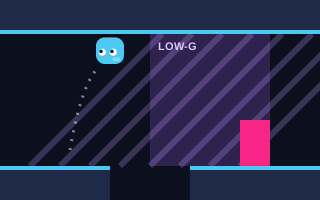
Gravity Jumper shows the contrast directly. One button flips gravity so you fall to the ceiling or back to the floor, and inside low-gravity zones (shaded purple) the flips become slower and floatier. Same controls, different constant, very different timing.
Step 3: variable jump height
A common technique lets the length of your press control the height of the jump. The launch is always the same, but if you release the button while still rising, the game cuts the upward velocity, often by multiplying it by a fraction:
if (jumpReleased && velocityY < 0) velocityY *= 0.5
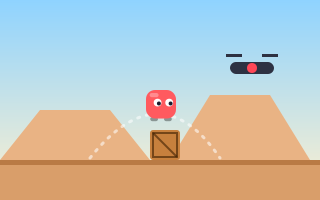
Gravity then finishes the job sooner, so a quick tap produces a short hop and a long hold produces the full arc. Jump Over is built around this: tap for a short hop, hold for a higher jump. Some hovering drones are placed so that a full jump hits them while a short hop passes underneath, so choosing the right press length is the whole skill.
Try this: in any game with variable jump height, practice a deliberate "tap and release" rhythm on low obstacles. Most accidental high jumps come from holding the button a fraction too long out of habit.
Step 4: horizontal motion and momentum
Sideways movement follows the same pattern with its own velocity. Some games set horizontal speed instantly when you press a direction. Others use acceleration and friction, so you build speed over time and slide a little when you let go:
velocityX += inputDirection * acceleration * dtvelocityX *= friction(a number slightly below 1 when no key is held)
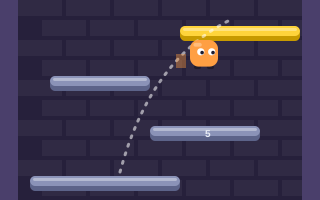
Momentum can also feed into the jump itself. In Tower Jumper, you build horizontal momentum, and the faster you run, the higher you jump; you can also bounce off the side walls. A formula like jumpSpeed = baseJump + abs(velocityX) * bonus captures the idea. The practical lesson is that a running start is not optional there: it is the difference between clearing one floor and clearing several for a combo bonus.
Air control
Real objects cannot change direction in mid-air, but most arcade characters can. Designers usually allow steering during a jump, sometimes at reduced strength. That is why you can correct a jump in Endless Jumper after it starts, drifting left or right onto the next platform while the automatic bounce carries you up.
Step 5: collision and landing
Each frame, after moving, the game checks whether the character now overlaps anything solid. Most arcade games treat the character and platforms as rectangles (axis-aligned bounding boxes), because rectangle overlap is fast and predictable to test.
When an overlap is found, the game pushes the character back out and zeroes the velocity in that direction. Landing on top of a platform sets velocityY = 0 and marks the character as grounded, which allows the next jump.
One-way platforms
Many vertical games use platforms you can jump up through from below but land on from above. The rule is simple: only count a collision if the character is falling and was above the platform's top edge on the previous frame.
if (velocityY > 0 && previousBottom <= platformTop) land()
Without this check, a character rising through a platform would snap onto it mid-jump or get stuck inside it.
Bounces, springs and boosted landings
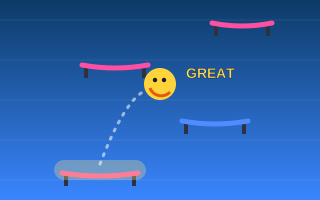
An automatic bounce is just a landing that immediately sets a new upward velocity instead of stopping. A spring pad uses a larger value. Bounce Up adds a timing layer: pressing Jump just as the ball touches a trampoline pad gives a boosted bounce rated GOOD or GREAT, and chaining boosts climbs faster. Physically, that is a bigger launch velocity awarded for pressing inside a short window around the moment of contact.
Step 6: player-friendly tricks
Strict physics can feel unfair because human reactions are not frame-perfect. Designers in the platform genre commonly soften it with a few well-known techniques:
- Coyote time: allow a jump for a few frames after walking off a ledge.
- Jump buffering: remember a jump press made just before landing and perform it the moment you touch down.
- Extra air jumps: a counter that allows one additional jump before landing, the basis of the double jump. See double jump mechanics explained.
These are general genre techniques; how much of each a given game uses is a design choice. Our arcade design basics guide discusses when they help.
Key takeaways
- Every frame: add gravity to velocity, then add velocity to position, both scaled by elapsed time.
- Jump height depends on launch speed squared divided by twice the gravity.
- Releasing early and cutting upward velocity is how variable jump height works.
- Momentum-based games like Tower Jumper tie jump height to running speed.
- One-way platforms only register a landing while you are falling from above.
Physics sets the rules; timing is how you play within them. Continue with why timing matters in jumping games.