Jumping Game Controls Explained
Jumping games use a small number of control schemes, and knowing which one you are dealing with tells you what the game is really testing. A single tap tests timing, tap-versus-hold tests how long you press, a power meter tests when you press, and steering controls test positioning. This guide explains each scheme, shows how it works in a specific game, and covers the adjustments that help when you move between keyboard and touch.
Why the control scheme shapes the whole game
In a jumping game, controls are not just an interface. They define the skill being measured. Two games can both involve jumping over spikes, yet feel completely different because one gives you a single fixed jump and the other lets you steer mid-air. When a game feels unfair, the cause is often a mismatch between how you are pressing and how the game reads your input.
It helps to sort schemes along two questions. First, how many inputs do you have? One button, two directions, or two directions plus a jump. Second, what does the jump input measure? The moment you press, the length of the press, or the state of something else on screen when you press.
Single-press schemes: when only the moment matters
The simplest scheme is one input that always does the same thing. The only variable is when you press.
Fixed jump
Press once, get a jump of set height. Jump Rush works this way: your character stays in the center while hazards slide in from both sides. The challenge is entirely about the moment of the press, including not pressing when nothing needs clearing, since a wasted jump resets your combo.
Switch sides
In Wall Jump, one press sends you from one wall to the opposite wall. You cannot choose direction, because there is only one other wall. You choose when, which decides whether you pass a spike section or a floating bar safely.
Gravity flip
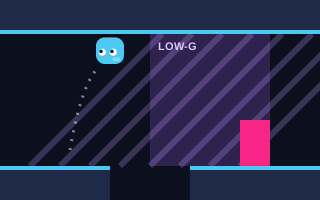
Gravity Jumper replaces the jump with a flip: one press sends you to the ceiling, the next brings you back to the floor. It still counts as a single-press scheme, but you have to think in two directions. In the purple-shaded low-gravity zones, flips become slower and floatier, so you need to press earlier to arrive in time.
Press-length schemes: tap versus hold
Some games read how long you hold the button, which gives one input a range of outcomes. This is usually called variable jump height.
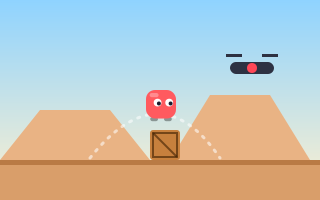
Jump Over is the clearest example. A quick tap produces a short hop and holding produces a higher jump. The game is designed around that difference: hovering drones are placed so that a full jump would hit them while a short hop passes underneath. On the ground, a wide or tall obstacle needs the full hold.
The common mistake with this scheme is pressing everything the same way. Treat tap and hold as two separate buttons in your head. Before each obstacle, decide "tap" or "hold" and commit.
Meter schemes: pressing against a moving gauge
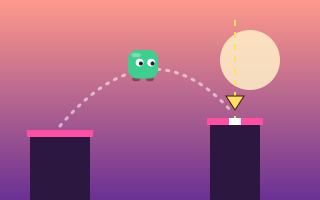
In a meter scheme, your press captures the value of something already moving on screen. Perfect Jump uses a power meter that swings back and forth. Pressing jumps with whatever power the meter shows at that instant, and landing in the small center target of the next pillar scores a PERFECT and builds a combo multiplier up to x5.
This scheme tests rhythm more than reaction. The meter moves in a repeating pattern, so you can watch one or two swings, feel the tempo and press on the beat. Because the meter speeds up over time, the rhythm you learned early in a run needs updating as you go.
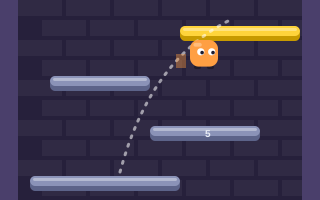
Bounce Up uses a related idea. The ball bounces automatically, and pressing Jump just as it touches a pad gives a boosted bounce rated GOOD or GREAT. Here the "meter" is the ball's own movement: you are pressing against a moving object rather than a gauge.
Steering schemes: left, right and sometimes jump
Once a game adds directional input, positioning becomes part of the skill.
| Scheme | Inputs | Example | What it tests |
|---|---|---|---|
| Steer only | Left, Right | Endless Jumper | Horizontal aim while bouncing automatically |
| Steer plus jump | Left, Right, Jump | Spike Jumper, Daily Jump Challenge | Positioning and timing together |
| Steer plus double jump | Left, Right, Jump twice | Sky Jump, Lava Jump | Adds a mid-air decision |
| Momentum | Left, Right, Jump | Tower Jumper | Building speed to increase jump height |
In Endless Jumper, you can steer with the arrow keys, A and D, on-screen touch buttons, or by tapping the left or right half of the screen. The jump is automatic, so all your attention goes into aiming.
Momentum schemes deserve special mention because they break the usual rule that a jump is always the same height. In Tower Jumper, the faster you run, the higher you jump. Releasing the direction key before a jump costs you height, so hold your run into the takeoff.
Keyboard versus touch: adjusting between them
The same game can feel different on a keyboard and on a phone. Neither is wrong, but each needs a slightly different approach.
- Keyboards give precise, fast presses and let you rest fingers on the keys. In Sky Jump, Jump can be Space, Up or W, so pick whichever lets you keep your steering hand comfortable.
- Touch screens have no physical feedback, so your thumb can drift off an on-screen button. Keep your thumbs in a fixed position and check they are still over the controls if inputs start being missed.
- Mouse clicks work in one-button games such as Perfect Jump, where Space, click and tap all do the same thing.
Our dedicated guides to keyboard controls for arcade games and mobile jumping game controls cover hand positions and device-specific habits in more depth.
How browser games read your input
Browser games receive keyboard input as key events, which report which key was pressed, and touch or mouse input as pointer events, which treat a finger, a stylus and a mouse in a unified way. That is why many games on Jumping Arcade accept a click, a tap and a key press interchangeably for the same action. The game then checks input on each animation frame and applies it to the character.
For you as a player, the practical point is simple: one input per action is enough. Mashing a key or tapping repeatedly does not make a jump stronger, and in combo-based games it can trigger wasted jumps.
Key takeaways
- Each control scheme measures something different: the moment, the length or the rhythm of a press, or your position.
- Single-press games such as Jump Rush and Wall Jump are pure timing tests, and pressing needlessly can cost you.
- In tap-versus-hold games like Jump Over, decide "tap" or "hold" before each obstacle.
- Meter schemes reward rhythm; watch a swing or two before pressing.
- Momentum games such as Tower Jumper make jump height depend on running speed.
- Adjust your technique for touch screens, especially how quickly you lift your finger.