One-Button Jumping Games Explained
A one-button jumping game gives you exactly one input, usually a key, a click or a tap, and builds the entire challenge around when and how you use it. The depth does not come from the controls but from the world: what is moving, how fast, and what a press does in each situation. This guide explains how that works, walks through the different kinds of one-button design with examples from Jumping Arcade, and clears up a few common misconceptions about the format.
What counts as a one-button game
The definition is strict: the player has a single action and no directional control. Your character's movement is handled by the game, whether that means auto-running, circling, sliding down a wall or standing still. Your button decides everything else.
This is different from games that are simply easy to control. Endless Jumper, for instance, has no jump button because bouncing is automatic, but it still uses two directional inputs, so it is a steering game rather than a one-button one. A one-button game removes steering entirely and lets timing carry the weight.
Where the depth comes from
If a button can only be pressed or not pressed, how do these games stay interesting for hundreds of runs? Designers add depth by changing what the press means or what surrounds it. Four levers show up again and again:
- When you press, relative to hazards, platforms or a meter.
- How long you press, if the game reads a tap differently from a hold.
- How many times you press before landing, if a mid-air second jump is allowed.
- What state the game is in when you press, such as which wall you are on or which way gravity points.
Combine one or two of those levers with rising speed and you have a game that is readable on the first try and still demanding after many attempts. The broader design ideas behind this are covered in our guide to arcade jumping game design basics.
The question each button asks
A useful way to understand any one-button game is to ask what single question the button answers. Here is how that plays out across the one-button games on Jumping Arcade.
"Now, or not yet?"
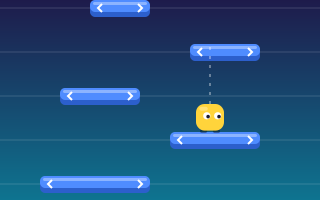
The purest form. Moving Platforms has rows sliding left and right above you, and your press sends you straight up to the next row. You land if a platform is under you. The only decision is whether this is the moment. Centered landings give a bonus, and platforms speed up and shrink as you climb.
Jump Rush asks the same question with a twist: pressing when nothing needs clearing counts as a wasted jump and resets your combo, so "not yet" is often the right answer.
"How much?"
Perfect Jump uses a swinging power meter, so the moment you press determines the strength of your jump. Jump Over reads press length instead: tap for a short hop, hold for a higher jump. Its hovering drones exist specifically to punish holding when a hop would do.
"Once, or twice?"
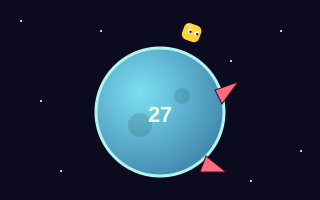
Tiny Jumper lets you tap again in mid-air for a double jump as your runner circles a small round planet. Double Jump Challenge does the same across floating platforms, with two dots showing how many jumps remain. The extra decision is whether a hazard needs the second jump or whether saving it is safer.
"Which way am I going?"
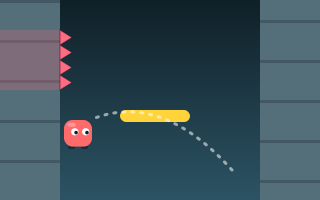
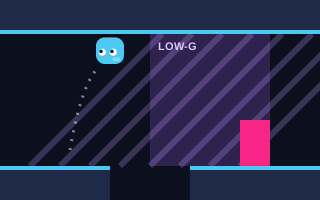
Some one-button games change what the button does depending on where you are. In Wall Jump, you cling to one wall and slowly slide down; pressing leaps you to the opposite wall, so the direction of your jump alternates. In Gravity Jumper, the button flips gravity, sending you to the ceiling or back to the floor. The press is always the same, but its effect depends on your current state.
Speed is the game's second control
You have one input, but the game has another: speed. Nearly every one-button game increases pace over time. Tiny Jumper speeds up every lap. Jump Over and Double Jump Challenge accelerate as you run. Perfect Jump's meter swings faster, and Moving Platforms' rows slide faster.
This is what gives runs their shape. The early part of a run teaches the pattern at a comfortable speed, and the later part asks you to execute the same pattern with less time. The skill you are building is not a new move; it is the same move under tighter conditions.
Environments can change the feel too. Gravity Jumper's low-gravity zones, shaded purple, make flips slower and floatier, so the same press takes longer to resolve. Wall Jump mixes spiked wall sections with floating bars between the walls, which changes where it is safe to be at each moment.
Common misconceptions about one-button games
"They are only for beginners"
One-button games are easy to start, which is different from easy to master. Several of them, such as Jump Rush, are among the more demanding games on the site because the input is simple but the timing windows get very tight.
"It is all reflexes"
Reaction speed helps, but most one-button games reward anticipation more. Hazards and platforms follow readable patterns, and pressing based on a cue you have learned is more reliable than waiting to react.
"Pressing more often is safer"
In several games it is the opposite. Extra presses waste jumps, spend a double jump you needed later, or flip gravity at the wrong time. Restraint is part of the skill.
Who one-button games suit
One-button games work well when you want to play in short bursts, on a phone held in one hand, or with a single key on a keyboard. They are also a good fit if you find juggling several controls distracting, since all your attention can go to reading the screen.
They are a strong training ground for other jumping games, too. The timing habits you build in Moving Platforms or Perfect Jump carry over to games with steering, where you have to time jumps while also positioning. For a method to sharpen those habits, see how to improve jump timing, and for how one-button input compares to other schemes, read jumping game controls explained. You can find every title of this type in the one-button jump games category.
Key takeaways
- A one-button game has a single input and no steering; the game handles movement.
- Depth comes from when you press, how long, how many times, and what state the game is in.
- Identifying the question your button answers tells you what to practice.
- Rising speed is the game's way of tightening the same challenge over a run.
- Anticipation and restraint matter more than raw reflexes or frequent pressing.